| Formats | JPG, PDF, SVG, AI |
| Resolution | 300dpi |
| Dimensions | 300dpi: 5000 x 5000 px |
| Version | 1.2 |
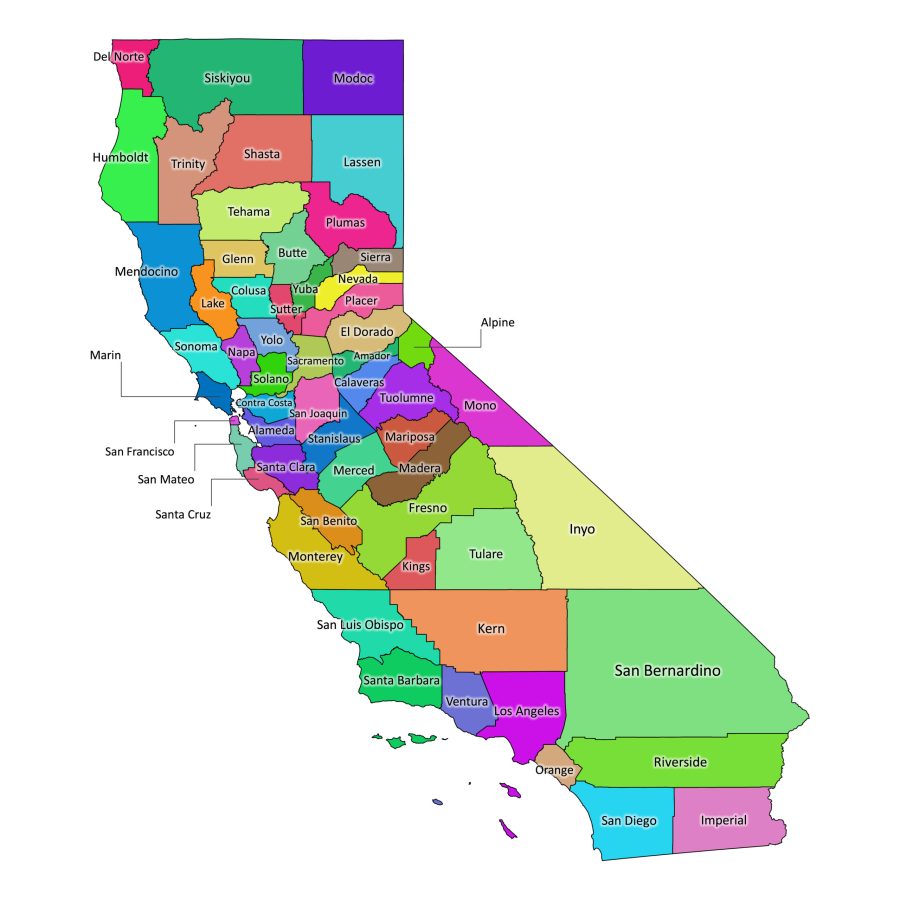
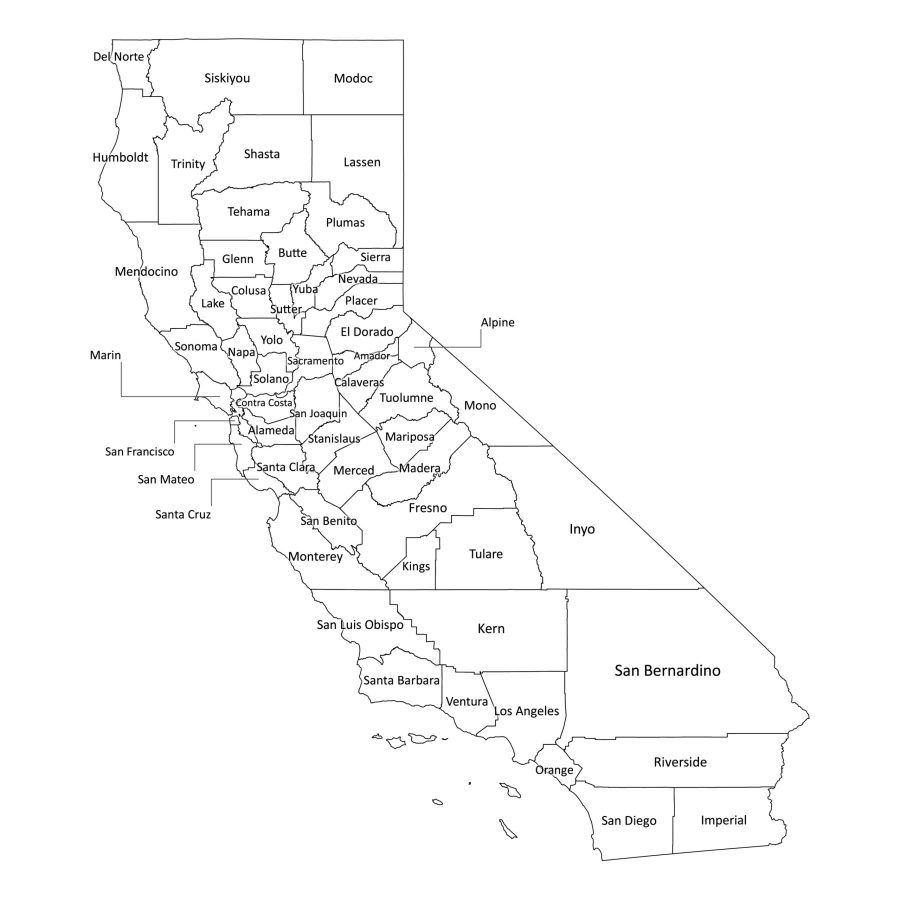
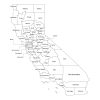
This California labeled map is a detailed digital guide to all 58 counties of the Golden State. Designed for classrooms, home study, research, and professional use, it provides clear county boundaries and readable labels in both color and black-and-white versions. Whether you are preparing a lesson, planning a project, or simply exploring California’s geography, this map offers a clean, easy-to-use visual reference.
Why choose this California county map
Clear and accurate county labeling
The map shows all 58 counties with precise boundaries and legible labels. Each county name is laid out to minimize overlap and clutter, making it easy to identify regions at a glance. This is especially helpful for:
- Teachers explaining regional geography
- Students completing assignments or projects
- Researchers and analysts preparing reports
- Businesses creating location-based presentations
The layout is designed so that important details remain readable whether you use the map on screen or in print.
Flexible for multiple uses
This digital map works well in many different contexts:
- Education: Use it in slides, worksheets, wall posters, or quizzes.
- Presentations: Add it to reports, proposals, or slide decks to illustrate data by county.
- Home and office décor: Print the colored version as a wall reference or a learning aid.
- Digital projects: Integrate the map into websites, blogs, or social media posts where you need a clear view of California’s counties.
Because the files are provided in several formats, you can adapt the map to your preferred workflow without needing advanced technical skills.
File formats available
This map comes in multiple file formats, namely:
PDF – ready for print and presentations
The PDF version maintains sharp lines and crisp text, making it ideal for:
- High-quality printing on home or office printers
- Inserting into reports, booklets, or handouts
- Projecting during lessons or meetings
The PDF preserves clarity at different sizes, from small reference sheets to large posters.
JPG – high-resolution image
The JPG file offers a convenient image format for:
- Websites and blogs
- Online learning platforms
- Social media posts and digital documents
It balances file size and image quality, so you can share or upload it easily while still retaining clear labels.
SVG – scalable vector graphics
The SVG version is a true vector file, which means it can be scaled up or down without losing quality. This is especially useful if you:
- Need to display the map at very large sizes
- Want to embed it in responsive web designs
- Prefer a format that stays sharp on high-resolution screens
AI – fully editable in Adobe Illustrator
The AI file is perfect if you want to customize the map:
- Change colors to match your brand or classroom theme
- Add new labels, icons, or data overlays
- Highlight specific counties or regions
Because it is a layered vector file, you have fine control over each element while keeping the original structure intact.
How to edit the map (using Adobe Illustrator)
If you choose to customize the map, you can do so easily with the AI file:
- Open the AI file
- Launch Adobe Illustrator.
- Open the California county map file from the ZIP folder.
- Adjust colors and styles
- Select counties or text layers to change their colors.
- Modify line thickness, fonts, or background styles as needed.
- Add your own content
- Insert labels, arrows, or notes for lessons or presentations.
- Overlay charts or icons to visualize data by county.
- Save or export
- Save a new AI file if you want to keep the original intact.
- Export to PDF, JPG, or SVG depending on how you plan to use the edited map.
Is California labeled map printable?
Yes. The map is designed with print use in mind. Both the black-and-white and color versions work well for:
- Classroom posters
- Handouts and worksheets
- Study guides and reference sheets
For best results, use the PDF version when printing. It preserves the fine details and ensures the county names remain sharp and readable.
How many counties are in California?
California has 58 counties, all clearly shown on the map. These include:
Alameda, Alpine, Amador, Butte, Calaveras, Colusa, Contra Costa, Del Norte, El Dorado, Fresno, Glenn, Humboldt, Imperial, Inyo, Kern, Kings, Lake, Lassen, Los Angeles, Madera, Marin, Mariposa, Mendocino, Merced, Modoc, Mono, Monterey, Napa, Nevada, Orange, Placer, Plumas, Riverside, Sacramento, San Benito, San Bernardino, San Diego, San Francisco, San Joaquin, San Luis Obispo, San Mateo, Santa Barbara, Santa Clara, Santa Cruz, Shasta, Sierra, Siskiyou, Solano, Sonoma, Stanislaus, Sutter, Tehama, Trinity, Tulare, Tuolumne, Ventura, Yolo, and Yuba.
This California labeled map brings together accurate geography, practical file formats, and easy customization in one convenient download. It is a reliable resource for anyone who needs a clear visual of California’s counties—whether for teaching, studying, planning, or presenting.

Reviews
There are no reviews yet